Day 3: Representing Code: Grammars, BNF, and Abstract Syntax Trees
Welcome back, In Day 2, we built our lexical analyzer the component that transforms raw text into tokens. We went from a string of characters like x = 10 + y; to a neat sequence of labeled tokens: IDENTIFIER, EQUALS, NUMBER, PLUS, IDENTIFIER, SEMICOLON.
But here’s the thing: tokens are still just a flat list. They’re like words in a sentence. Just because you can read individual words doesn’t mean you understand the sentence’s structure or meaning. so, before we start building the parser we need to find a solution for this.
Today, we’re taking the next giant leap: learning how to represent the structure and meaning of code. This is where things get really interesting, because we’re going to discover that code isn’t just a sequence, it’s a tree.
If Day 2 was about recognizing the words, today is about understanding the grammar of the language that we are building.
The Problem: Flat Isn’t Enough
Imagine you have these flat list of tokens:
1 + 2 * 3
Which becomes:
NUMBER(1) PLUS NUMBER(2) STAR NUMBER(3)
Good, But what does this mean? More importantly, in what order should we evaluate it?
If you evaluate left to right, you get: (1 + 2) * 3 = 9
But if you remember your math class, you know it should be (BODMAS Rule/Order of Operations): 1 + (2 * 3) = 7
The multiplication has higher precedence, it should happen first. Our flat list of tokens doesn’t capture this structure. We need something that explicitly shows: “The multiplication is nested inside the addition.”
This is where syntax trees comes into play,
What is a Syntax Tree?
A syntax tree is exactly what it sounds like: a tree-shaped data structure that represents the grammatical structure of your code.
lets take 1 + 2 * 3 as an example, break it down and build a syntax tree:
       [+]
      /   \
    [1]   [*]
          /  \
        [2]  [3]
See how the multiplication is a subtree of the addition? This explicitly shows that we need to evaluate 2 * 3 first, then add the result to 1.
Why Trees Work So Well
Trees are perfect for representing code because:
- They show nesting: Operations within operations, expressions within expressions
- They enforce order: Child nodes must be evaluated before parent nodes
- They’re recursive: An expression can contain other expressions, which can contain other expressions, and so on…
- They’re unambiguous: There’s exactly one way to interpret the structure
But First: What Is a Grammar?
Before we can build trees, we need to understand grammars, the rules that define what valid code looks like.
The Grammar of Email Addresses
You know what a valid email address looks like, right? [email protected] is valid, but @[email protected] is gibberish. There are rules for what makes an email valid:
- It must have a username part
- Then an
@symbol - Then a domain name
- The domain must have at least one dot
- After the dot, there must be a domain extension
These are grammar rules. They define the structure of valid email addresses.
Programming languages have grammar rules too, but they’re much more complex than grammar rules for email addresses.
Differenr types of Grammars
Grammars exist on a spectrum from simple to complex.
Regular Grammars (What We Used for Scanning)
For our lexer used regular expressions and regular grammars. These are the simplest type, perfect for recognizing flat patterns.
A regular grammar can recognize things like:
- Keywords:
cast,enchant,manifest - Numbers:
123,45.67 - Identifiers:
userName,dragon_age
But regular grammars have a limitation: they can’t count or match nested structures.
Think about matching parentheses: ((())). A regular grammar can’t ensure that the number of opening parens equals the number of closing parens. It can recognize individual parens, but it can’t count them.
This is a problem because code is full of nesting and nested structures
# We need to match these:
( 1 + ( 2 * ( 3 - 4 ) ) )
{ if (x) { while (y) { ... } } }
For this, we need something more powerful than regular grammars
Context-Free Grammars (CFGs)
Context-Free Grammars are one level up in power. They can handle nested structures, recursion, and keep counts.
A CFG consists of:
- Terminals: The actual tokens from our lexer (like
NUMBER,PLUS,IF) - Non-terminals: Placeholders for patterns (like
expression,statement) - Production rules: Recipes that say how to build non-terminals from terminals and other non-terminals
Car Order Grammar
Let’s start with something fun and practicle before we dive into code. Here’s a grammar for describing a car order:
car    → trim "with" car "upgrades"
       | trim
       | engine

trim   → "sport" "package"
       | "luxury" "edition"
       | "offroad"

engine → "turbocharged" "inline four"
       | "twin turbo" "V6"
       | "electric" "motor"
Let me break this down:
car,trim, andengineare non-terminals (categories)- Things in quotes like
"sport"and"package"are terminals (actual words) - The
→means “can be made from” - The
|means “or” (multiple choices)
Using these rules, we can generate valid car configurations:
Start with car, pick a rule:
car → trim "with" car "upgrades"
Now expand trim, choose:
trim → "luxury" "edition"
For the second car, choose:
car → engine
Then:
engine → "turbocharged" "inline four"
Final result: "luxury" "edition" "with" "turbocharged" "inline four" "upgrades"
That’s a valid car configuration, The grammar generated it by following the rules.
why did we choose the car twice ?
We choose car twice because of a powerful concept in computer science called recursion. It’s the secret trick that allows a short list of grammar rules to handle infinitely long descriptions.
Look at that first rule again:
car → trim "with" car "upgrades"
Notice, how car appears on the left side (the definition) and also on the right side (the ingredients). Because car is inside its own definition, you can keep nesting upgrades for as long as you want. How it looks in action
If you wanted a car with multiple upgrades, you could chain them together by choosing that first rule over and over again:
- First choice: trim “with” car “upgrades”
- Second choice (expand the inner car): trim “with” (trim “with” car “upgrades”) “upgrades”
- Third choice (expand the inner car again): trim “with” (trim “with” (engine) “upgrades”) “upgrades”
Without that second car, we would only ever be allowed to pick exactly one trim or one engine, and our grammar would stop right there. Including car twice acts like a loop, letting us stack as many customizable options onto our vehicle as our budget (or the grammar) allows.
BNF: A Notation for Writing Grammars
When computer scientists write grammars, they use a notation called Backus-Naur Form (BNF). It’s just a standardized way to write production rules.
Here’s the BNF notation we’ll use:
rule_name  → symbols go here ;
          | or another option ;
Plus some convenient shortcuts:
*means “zero or more times”+means “one or more times”?means “optional (zero or one time)”( )for grouping|for alternatives
So instead of writing:
horsepower → "super"
| "super" "super"
| "super" "super" "super"
| ...
We can write:
horsepower → "super"+ ;
Much cleaner
A Grammar for Math Expressions
Now let’s apply this to actual code. Here’s a simple grammar for arithmetic expressions:
expression → literal
           | unary
           | binary
           | grouping ;

literal    → NUMBER | STRING | "true" | "false" | "nil" ;

grouping   → "(" expression ")" ;

unary      → ( "-" | "!" ) expression ;

binary     → expression operator expression ;

operator   → "==" | "!=" | "<" | "<=" | ">" | ">="
           | "+"  | "-"  | "*" | "/" ;
Let’s trace through how this generates 1 + 2 * 3:
- Start with
expression - Choose
binary binary→expression operator expression- First
expression→literal→NUMBER→1 operator→+- Second
expression→binary(recursion!) - That
binary→expression operator expression - →
NUMBER*NUMBER - →
2 * 3
Final: 1 + 2 * 3
Notice how the grammar naturally creates a tree structure through recursion.
From Grammar to Trees : Abstract Syntax Trees (ASTs)
When we parse code using a grammar, we build a tree. But not just any tree, an Abstract Syntax Tree (AST).
What Makes It “Abstract”?
A concrete syntax tree (or parse tree) includes EVERY detail from the grammar, including punctuation, keywords, and grouping symbols.
An abstract syntax tree strips away the syntactic noise and keeps only what matters for meaning.
For example, parsing (1 + 2) with parentheses:
Concrete syntax tree:
     grouping
    /    |    \
   (  expression )
        |
      binary
     /   |   \
    1    +    2
Abstract syntax tree:
    +
   / \
  1   2
The parentheses did their job (enforcing grouping), so we don’t need them in the AST. The tree structure itself shows the grouping.
AST Example: Breaking Down 1 + 2 * 3
Let’s build the complete AST for 1 + 2 * 3:
        Binary (+)
        /        \
    Literal(1)  Binary (*)
                /        \
            Literal(2)  Literal(3)
Each node is an expression type:
Binary expression at the root: the addition operation
- Left child: a Literal expression (the number 1)
- Right child: another Binary expression (the multiplication)
The multiplication Binary expression:
- Left child: Literal expression (the number 2)
- Right child: Literal expression (the number 3)
To evaluate this tree, we work from the bottom up (post-order traversal):
- Evaluate
Literal(2)→ 2 - Evaluate
Literal(3)→ 3 - Evaluate
Binary(*)with 2 and 3 → 6 - Evaluate
Literal(1)→ 1 - Evaluate
Binary(+)with 1 and 6 → 7
The tree structure automatically enforces the correct order of operations.
Real World Analogy: ASTs Are Like Organizational Charts
Think of an AST like a company org chart:
           CEO
          /   \
    Marketing  Engineering
       |       /     |     \
    Social   Backend Frontend Mobile
- The CEO is the “root” (top-level node)
- Departments are “child nodes”
- Teams are “leaf nodes”
To get work done, you start at the leaves (teams do actual work) and results flow upward. Same with ASTs: leaf nodes (literals) provide values, operators combine them, and results flow up to the root.
Implementing the AST: From Theory to Code
Now comes the fun part: actually designing the architecture to represent these trees in C++.
The Challenge: Many Expression Types
We need classes for each type of expression:
- Binary:
1 + 2,x * y,a == b - Unary:
-5,!true - Literal:
42,"hello",true - Grouping:
(1 + 2)Each type has different data: - Binary has TWO operands (left and right) and an operator
- Unary has ONE operand and an operator
- Literal has just a value
- Grouping has one sub-expression We could make one giant class with fields for everything, but that’s messy. Instead, we’ll use inheritance with a base
Exprclass and derived classes for each type.
The Expression Class Hierarchy Architecture
In C++, we structure this using:
Base Class: An abstract Expr class that defines the interface all expressions must follow
Derived Classes: Concrete classes like Binary, Unary, Literal, and Grouping that inherit from Expr
Each derived class is simple—just a container for its specific data. No methods, no logic. Just pure data structures with:
- Member variables to hold the expression’s data
- A constructor to initialize those variables
- That’s it. For example:
Binaryholds: a left expression pointer, an operator token, and a right expression pointerUnaryholds: an operator token and a right expression pointerLiteralholds: a value (could be a number, string, boolean, or nil)Groupingholds: a single sub-expression pointer “Wait,” you might be thinking, “where’s all the behavior? Shouldn’t these classes DO something?”
This brings us to a fundamental problem in programming…
The Expression Problem: OOP vs Functional Programming
Here’s the dilemma: We have multiple types (Binary, Unary, Literal, Grouping) and we’ll need multiple operations on them (evaluate, print, analyze, type-check, etc.).
How do we organize this code?
The OOP Way
In object-oriented programming, you’d add methods to each class:
Each expression class would have methods like:
evaluate()- to calculate the resultprint()- to display the treeanalyze()- for type checking- And so on… Pros: Easy to add new expression types just create a new class
Cons: Hard to add new operations you must modify ALL existing classes
Imagine you have 21 expression classes. Adding one new operation means opening all 21 files and adding a method to each. That’s a maintenance nightmare.
The Functional Way: Pattern Matching
In functional languages, you’d write separate functions that pattern match on the expression type:
Each operation is one function that handles all types:
- One
evaluate()function with cases for Binary, Unary, Literal, etc. - One
print()function with cases for all types - One
analyze()function with cases for all types Pros: Easy to add new operations—just write a new function
Cons: Hard to add new types—you must modify ALL existing functions
If you add a new expression type, you must update every single operation function. With dozens of operations, that’s equally painful.
The Problem
Neither approach makes it easy to add BOTH new types AND new operations. This is called the Expression Problem.
For our interpreter, we’ll face this head-on: we have a fixed set of expression types, but we’ll constantly add new operations (parsing, evaluating, type checking, optimizing, etc…)
We need a solution that lets us add operations easily without touching the expression classes.
The Visitor Pattern
The Visitor Pattern solves the expression problem (in OOP languages) by adding a layer of indirection. It lets us define new operations on our expression types without modifying the classes themselves.
Here’s the key insight: Instead of putting operation methods IN the expression classes, we pass the expressions TO separate operation classes.
The Pattern Architecture in C++
The Visitor pattern in C++ involves a clever dance between two hierarchies:
1. The Expression Hierarchy (what we’re operating on):
- Base
Exprclass - Derived classes:
Binary,Unary,Literal,Grouping2. The Visitor Hierarchy (the operations): - Base
Visitorinterface (template class) - Derived visitor classes:
Evaluator,Printer,TypeChecker, etc.
How The Pieces Fit Together
The Visitor Interface defines a pure virtual method for each expression type:
visitBinaryExpr()- handles Binary expressionsvisitUnaryExpr()- handles Unary expressionsvisitLiteralExpr()- handles Literal expressionsvisitGroupingExpr()- handles Grouping expressions The visitor is templated on a return typeR, so different operations can return different types:- The printer returns strings
- The evaluator returns values (numbers, booleans, etc.)
- The type checker returns type information The Expression Classes each have ONE method:
accept() - This method takes a visitor as a parameter
- It calls the appropriate visit method on that visitor
- It passes itself (
this) to the visitor The Concrete Visitors implement the interface: - Each one is a complete operation
- It has specific logic for handling each expression type
- All the code for one operation lives in one class
The Double Dispatch Magic
Here’s where it gets clever. When you want to perform an operation on an expression, this happens:
- First Dispatch: You call
expression->accept(visitor)- C++ polymorphism routes this to the correct derived class’s
accept()method - A
Binaryexpression’s accept runs, or aUnary’s, based on the actual type
- C++ polymorphism routes this to the correct derived class’s
- Second Dispatch: That
accept()method calls back to the visitor- Binary’s accept calls
visitor->visitBinaryExpr(this) - Unary’s accept calls
visitor->visitUnaryExpr(this) - The visitor now has the specific expression type Two dispatches, hence “double dispatch.” The first finds the right expression class, the second finds the right operation method.
- Binary’s accept calls
Real World Analogy: Airport Security Screening
Think of airport security with different types of travelers and different screening procedures:
Travelers (Expressions):
- Regular passengers
- Crew members
- Passengers with special needs
- First-class passengers Screening Procedures (Visitors):
- Security check visitor
- Baggage handling visitor
- Boarding pass verification visitor When you (a traveler) go through security (accept a visitor):
- The system identifies what TYPE of traveler you are (first dispatch)
- Based on your type, you’re routed to the appropriate screening procedure (second dispatch)
- The screening procedure knows exactly how to handle YOUR type of traveler Different screening procedures (visitors) can be added without changing traveler types. If tomorrow they add a “health screening visitor,” all traveler types automatically support it through their existing
accept()method.
Why This Solves Our Problem
Remember the table from earlier? Rows are expression types, columns are operations.
Without visitors, adding a column (new operation) means:
- Open 21 expression class files
- Add a new method to each
- Risk breaking existing code With visitors, adding a column (new operation) means:
- Create ONE new visitor class
- Implement the visit methods for each type
- Expression classes remain untouched We’ve essentially flipped the problem on its head. Now adding operations is easy.
The Trade-Off
The visitor pattern isn’t free:
What we gain:
- Easy to add new operations
- All logic for one operation in one place
- Clean separation of concerns
- Type-safe dispatch to the right handler
What we give up:
- More complex initial setup
- Adding new expression types requires updating all visitors
- Extra indirection can be harder to follow at first For a compiler/interpreter, this trade-off is perfect. Our expression types are relatively stable (they’re defined by the language grammar), but we constantly add new operations (parsing, evaluating, optimizing, etc.).
Meta-Programming
Writing all those expression classes by hand is tedious. For Binary, Unary, Literal, Grouping, that’s manageable. But by the time we’re done with our language, we’ll have 21+ expression types.
Each one follows the exact same pattern:
- A class declaration
- Member variables for its data
- A constructor that initializes those variables
- An
accept()method that calls the right visitor method - Proper memory management (destructors in C++) Rather than type all that boilerplate repeatedly (and risk typos or inconsistencies), we’re going to use code generation—writing a program that writes programs.
The Generator Architecture
The idea is simple: create a small utility program that:
- Takes a description of each expression type (name and fields)
- Generates the C++ code for all the classes
- Outputs the complete header file ready to use The description format is straightforward—for each expression type, we specify:
- The class name (like “Binary” or “Unary”)
- The list of fields with their types (like “left expression, operator token, right expression”)
What Gets Generated
For each expression type described, the generator creates:
Class Declaration: The derived class that inherits from Expr
Member Variables: Private or public members for all the data
- Smart pointers for sub-expressions (using
std::unique_ptrorstd::shared_ptr) - Tokens for operators
- Values for literals Constructor: Takes parameters for each field and initializes them
- In C++, this often uses member initializer lists for efficiency
- Handles transferring ownership of smart pointers Destructor: Properly cleans up resources
- Though with smart pointers, this is often automatic
- The rule of five/three considerations Accept Method: The visitor pattern implementation
- Pure virtual in the base class
- Overridden in each derived class to call the correct visitor method The Base Class: Also generated, including:
- The pure virtual
accept()method - Virtual destructor for proper cleanup
- Any shared functionality The Visitor Interface: A template class with:
- Pure virtual visit methods for each expression type
- Template parameter for the return type
- Virtual destructor
Why Generate Code?
- DRY (Don’t Repeat Yourself): The pattern is identical across all 21 types
- Consistency: Every class follows exactly the same structure
- Easy updates: Adding a new expression type = one line in the generator’s input
- Error prevention: No typos in 21 hand-written classes
- Maintainability: Change the pattern once, regenerate, done
C++ Specific Considerations
The generator needs to handle C++ specifics that don’t exist in other languages:
Header Guards: Include guards or #pragma once to prevent multiple inclusion Forward Declarations: Sometimes needed to break circular dependencies Smart Pointers: Choosing between unique_ptr (exclusive ownership) and shared_ptr (shared ownership) Move Semantics: Generated constructors should support move operations for efficiency Const Correctness: Making appropriate methods and parameters const Namespace Management: Putting everything in the appropriate namespace
The Build Process
The workflow looks like this:
- Write the generator once (it’s a small C++ program or script)
- Run the generator whenever you add/modify expression types
- The generator outputs
Expr.h(and possiblyExpr.cpp) - Your main project includes the generated files
- Build the interpreter as usual This is meta-programming: using code to write code. It’s common in compiler development where patterns repeat extensively.
Putting It All Together: The AST Printer
Let’s put the Visitor pattern into action by creating something useful: an AST printer that shows the tree structure.
The Goal
Given this tree:
      Binary(*)
     /         \
 Unary(-)    Grouping
    |            |
Literal(123) Literal(45.67)
We want to print:
(* (- 123) (group 45.67))
It’s Lisp-style notation that makes the tree structure crystal clear. Each opening parenthesis shows a node in the tree, and the contents show its children.
The Architecture
The AstPrinter is our first concrete visitor class. It:
Implements the Visitor Interface: Specifically, Visitor<std::string> since we want to produce strings
Has Visit Methods: One for each expression type
visitBinaryExpr()- formats binary operations like(+ 1 2)visitUnaryExpr()- formats unary operations like(- 5)visitLiteralExpr()- formats literal values like123or"hello"visitGroupingExpr()- formats grouped expressions like(group ...)Uses a Helper Method: Aparenthesize()function that:- Takes a name/operator and a list of sub-expressions
- Wraps them in parentheses:
(name expr1 expr2 ...) - Recursively calls
accept()on each sub-expression
How It Works: The Recursive Dance
When you call the printer on a tree, here’s the flow:
- Entry Point: Call
print(expression)on the root node - First Accept: The root expression’s
accept()is called with the printer - Type Routing: Based on the actual expression type, the right
accept()implementation runs - Visit Call: That
accept()calls the corresponding visit method:visitBinaryExpr(this) - Recursive Processing: The visit method processes this node and recursively calls
accept()on child expressions - Bottom-Up Building: Recursion unwinds, building the string from leaves to root
- Final Result: The complete string representation
Example Walkthrough
Let’s trace through printing (* (- 123) (group 45.67)):
Step 1: Start at the root Binary(*) node
- Call
accept()on the Binary expression - Routes to
visitBinaryExpr()Step 2: Visit method processes the Binary - Calls
parenthesize("*", left_expr, right_expr) - Opens with
(* - Now needs to process left child (the Unary) Step 3: Recursively call
accept()on the Unary(-) node - Routes to
visitUnaryExpr() - Calls
parenthesize("-", right_expr) - Opens with
(- - Needs to process its child Step 4: Recursively call
accept()on Literal(123) - Routes to
visitLiteralExpr() - Simply returns
"123"(no children to recurse on) Step 5: Unary complete - Gets back
"123"from its child - Completes:
(- 123) - Returns this string Step 6: Back to the Binary’s right child
- Call
accept()on the Grouping node - Routes to
visitGroupingExpr() - Calls
parenthesize("group", inner_expr)Step 7: Recursively process Grouping’s child - Literal(45.67) returns
"45.67" - Grouping completes:
(group 45.67)Step 8: Binary complete - Has left result:
(- 123) - Has right result:
(group 45.67) - Combines:
(* (- 123) (group 45.67))Done. The recursive structure of the visitor naturally mirrors the recursive structure of the tree.
The Beauty of Recursion
Notice the elegant symmetry:
Trees are recursive: Expressions contain sub-expressions contain sub-expressions…
Visitors are recursive: Visit methods call accept on sub-expressions, which call visit methods…
This mutual recursion is the heart of the visitor pattern. Each node handles its own printing by delegating to its children. No node needs to know the complete tree structure—just its immediate children.
It’s like a chain of command: the general doesn’t need to know every soldier’s name. The general commands the colonels, who command the majors, who command the captains, and so on. Each level handles its own responsibility and delegates downward.
Using the Printer
To use the printer in practice:
- Build a tree (manually for testing, or from the parser later)
- Create a printer instance:
AstPrinter printer; - Call print:
std::string result = printer.print(expression); - The result: A string showing the complete tree structure
This printer is invaluable for debugging. When your parser generates a tree, print it to verify it has the structure you expect. When expressions evaluate wrong, print the tree to see if the precedence is correct.
Beyond Printing: The Visitor Template
The printer demonstrates the visitor pattern, but remember: this pattern is a template for all operations.
Want to evaluate expressions? Create an Evaluator visitor:
visitBinaryExpr()evaluates both operands and applies the operatorvisitUnaryExpr()evaluates the operand and applies the operatorvisitLiteralExpr()returns the literal value- Same recursive structure, different logic. Want type checking? Create a
TypeCheckervisitor: visitBinaryExpr()checks that operands have compatible typesvisitUnaryExpr()checks the operand matches the operator’s requirements- Same pattern, different purpose. Every operation follows the same architectural pattern. Master it once, apply it everywhere.
Demo
A sample demo of the AST printer that we made.
input: -123 * (45.67)

Looking Ahead
We now have the data structures to represent code as trees. But we haven’t actually built those trees yet. That’s the job of the parser, which we’ll build in the next chapter.
The parser will:
- Take our flat sequence of tokens
- Use the grammar rules to understand structure
- Build the AST for us using our expression classes Then, once we have the tree, the interpreter will walk it (using another visitor) and execute the code.
We’re assembling the pieces of the puzzle:
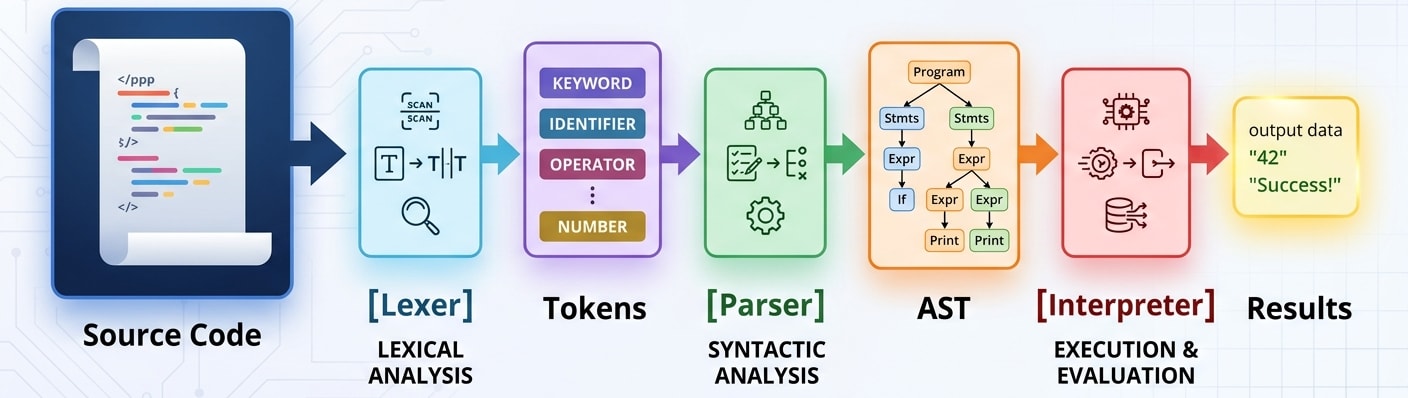
We’ve finished the lexer and defined the AST structure. Next up: the parser, where all this grammar theory gets put into practice.
In the next post, we’ll build the parser that creates these beautiful trees from our tokens. Get ready for some serious grammar gymnastics and the magic of recursive descent parsing.
Tags: /wyrdlang/ /interpreter/ /crafting-interpreters/ /cpp/ /c++/ /programming-language/ /ast/ /meta-programming/ /visitor-pattern/ /data-structures/ /tree/